

DNS WAF / proxy detected
Understanding traffic routing through edge security providers
What This Means
This finding provides architectural visibility into how traffic reaches your domain. It is informational and does not indicate a vulnerability or misconfiguration. In many cases, this reflects a positive security control.
What this check does
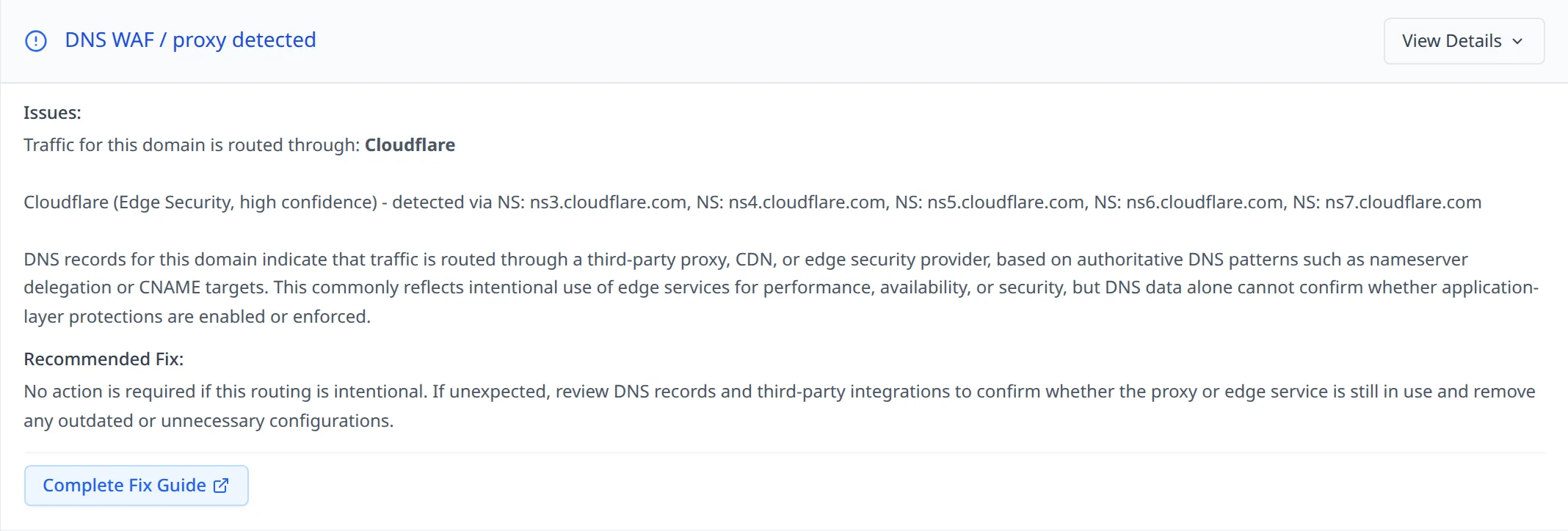
This check looks at authoritative DNS records to determine whether traffic for a domain is routed through a third-party proxy, CDN, or edge security provider. The detection is based on nameserver delegation and CNAME targets that point to known edge networks.
At the DNS level, this only shows how traffic is routed. It does not reveal firewall rules, security policies, or how traffic is handled once it reaches the provider.
What a DNS WAF or DNS proxy is
A DNS WAF or DNS proxy is not a firewall implemented inside DNS itself. DNS is simply used as the routing mechanism.
Instead of pointing directly to an origin server, DNS records direct users to infrastructure owned by a third party. That provider sits in front of the origin and forwards traffic after applying acceleration, filtering, or protection features.
These services typically act as reverse proxies and may include content delivery, DDoS mitigation, rate limiting, and optional web application firewall (WAAP) capabilities.
Why this setup is commonly used
Routing traffic through an edge provider using DNS is widely adopted because it is simple and scalable. It does not require changes to application code and can be rolled out or rolled back by adjusting DNS records.
Organizations commonly use this approach to reduce direct exposure of origin servers, handle large traffic spikes, improve global performance, and centralize security controls.
In many environments, this configuration is intentional and expected.
Is this a security issue?
On its own, no.
This finding does not indicate a vulnerability or a misconfiguration. It only shows that DNS is being used to route traffic through an external provider.
From DNS data alone, it is not possible to determine whether a WAF is enabled, how it is configured, or whether the origin is properly protected. For that reason, this check is informational by design.
When it may be worth reviewing
You may want to take a closer look if the provider shown is unexpected, no longer in use, or unfamiliar. This can happen when legacy services remain configured in DNS long after they have stopped being actively managed.
In these cases, the concern is usually around architectural clarity rather than security risk.
Recommended actions
No action is required if this routing is intentional.
If the configuration is expected, make sure the edge provider setup aligns with your security and availability requirements, and that origin access is restricted according to your internal policies.
If the configuration is unexpected, review DNS records and third-party integrations to identify and remove unused or outdated services.
DNS WAF and proxy providers detected by this check
This check can identify DNS routing through a range of well-known global and regional edge security platforms, including:
Global Providers
- Cloudflare
- Akamai
- Fastly
- Amazon CloudFront with AWS WAF
- Microsoft Azure Front Door
- Google Cloud CDN and Cloud Armor
- Imperva Incapsula
- F5 Distributed Cloud
- Radware Cloud WAF
- Barracuda Cloud WAF
- Sucuri Firewall
- StackPath
Regional Providers (APAC)
- Alibaba Cloud WAF
- Tencent Cloud WAF
- Baidu Cloud WAF
- Qianxin 360 WAF
- Wangsu Security
- ChinaCache
Detection is based on authoritative DNS routing patterns associated with these platforms, not on application-layer inspection.
Summary
This check helps you understand how traffic reaches your domain by looking at DNS routing. It provides architectural visibility without making assumptions about protection strength or risk, and is intended to support informed infrastructure decisions rather than raise alerts.