
Table of Contents
Email spoofing isn't a niche threat. According to Valimail's 2025 Disinformation and Malicious Email Report, more than 7.2 million domains have implemented some form of email authentication, but approximately half remain insufficiently protected against domain spoofing. The Verizon 2025 DBIR found that phishing remains the third most common initial access vector at 16% of all breaches, while ransomware appeared in 44% of confirmed breaches. What makes those numbers frustrating: a large proportion of those attacks succeed against organizations that already had SPF, DKIM, and DMARC in place.
According to EasyDMARC's 2025 DMARC Adoption Report,93.8% of Fortune 500 companies have DMARC records, but only 62.7% of those enforce the strictest policy (p=reject). That still leaves more than a third of the largest companies in the world exposed at the policy level, let alone at the subdomain and infrastructure level where the real gaps tend to be.
This post goes through exactly where SPF, DKIM, and DMARC fall short, what the real attack surface looks like, and what you can actually do about it at the DNS level.
The Big Three: A Quick Refresher
Most people treating these three protocols as a complete solution have a reasonable grasp of what each one does. The trouble is in what they were designed to do, and where those designs run out.
SPF: Sender Policy Framework
SPF lets you publish a list of mail servers that are authorized to send email on behalf of your domain. When a receiving server gets a message claiming to come from @yourcompany.com, it checks the SPF record in DNS and asks: "Did this email actually come from a server I'm allowed to trust?"
yourcompany.com. IN TXT "v=spf1 ip4:203.0.113.10 include:_spf.google.com include:sendgrid.net -all"Breaking that record down: v=spf1 declares the SPF version; ip4:203.0.113.10 is your outbound mail server IP; include:_spf.google.com authorizes Google Workspace; include:sendgrid.net authorizes transactional mail via SendGrid; -all hard-fails everything else.
Critical detail: SPF validates the envelope sender (the MAIL FROM address used in the SMTP handshake), not the From: header you see in your email client. This distinction will matter shortly.
DKIM: DomainKeys Identified Mail
DKIM uses asymmetric cryptography to sign outgoing emails. Your mail server signs the message with a private key; the public key lives in DNS. Any receiving server can verify the signature without needing to talk to you directly.
selector1._domainkey.yourcompany.com.   IN   TXT   (
    "v=DKIM1; k=rsa; p=MIIBIjANBgkqhkiG9w0BAQEFAAOCAQ8AMIIBCgKCAQEA"
    "2Vs8FpZAqj1QqJkE1kGT7Jf5tBmpMXqUh7..."
)
The key fields: v=DKIM1 is the version; k=rsa is the key type (ed25519 is also supported); p=... is the base64-encoded public key.
DKIM signs selected headers and the body of the message. This allows receiving servers to verify that the signed portions of the message weren't altered in transit, though not every header is necessarily protected. However, the signature is tied to the signing domain (the d= tag), not necessarily the visible From: domain.
DMARC: Domain-based Message Authentication, Reporting & Conformance
DMARC is the glue. It tells receiving servers what to do when SPF and/or DKIM checks fail, and it introduces the concept of alignment, requiring that the authenticated domain match the visible From: header domain.
_dmarc.yourcompany.com.   IN   TXT   (
    "v=DMARC1;"
    "p=reject;"
    "sp=reject;"
    "adkim=s;"
    "aspf=s;"
    "rua=mailto:[email protected];"
    "ruf=mailto:[email protected];"
    "pct=100"
)
The key parameters: p=reject tells receivers to reject failing messages; sp=reject applies the same policy to subdomains; adkim=s and aspf=s enforce strict alignment; rua and ruf send aggregate and forensic reports; pct=100 applies the policy to all messages.
Alignment means: the domain in MAIL FROM (for SPF) and in d= (for DKIM) must match the From: header domain. Without alignment, an attacker could pass SPF/DKIM checks using a different domain they control.
The alignment concept is key. DMARC alignment means a message must pass SPF and the SPF-authenticated domain must align with the From: header domain, OR pass DKIM with the signing domain aligned to the From: domain. It doesn't require both. Just one with alignment.
Where SPF, DKIM & DMARC Actually Fall Short
Even with a perfectly configured SPF record, rotating DKIM keys, and DMARC set to reject, there are gaps that attackers actively exploit. None of them require breaking cryptography.
Gap #1: The "From" Header vs. Envelope Sender Problem
SPF only validates the envelope sender, which is the address passed in the MAIL FROM command during the SMTP handshake. Users never see that address. The From: header shown in their email client is a separate field entirely, and SPF does nothing to constrain it.
DMARC's alignment requirement was designed to close this gap by requiring that the authenticated domain match the visible From: domain. But "relaxed" alignment (the default) checks alignment at the organizational domain level (as defined by the public suffix list), not the exact subdomain. That distinction opens doors that shouldn't be open.
Gap #2: Lookalike Domains
Your DMARC record only covers your domain. It has no reach over yourcompany-support.com, yourcompany.co, or yourcompаny.com (that last one uses a Cyrillic 'а'). An attacker can register any of these tomorrow, set up their own SPF and DKIM records, and send mail that passes all three authentication checks cleanly. The checks pass because, technically, the authentication is correct for that domain.
Gap #3: Parked Subdomains and Forgotten Infrastructure
DNS zones grow quietly over time. A subdomain created for a marketing campaign three years ago. Domains from an acquisition that never got cleaned up. Dev environments someone spun up and forgot. None of these are sending email, so nobody thought to add authentication records. By default, DMARC applies the parent domain's policy (p=) to subdomains unless sp= is explicitly set. The sp= tag is used to override that behavior, and misconfigurations here often leave subdomains less protected than intended.
Here's what a problematic configuration looks like:
_dmarc.yourcompany.com. IN TXT "v=DMARC1; p=reject; sp=none"The sp=none means subdomains have no enforcement policy at all. An attacker can send from [email protected] and the subdomain policy is "none" - receiving servers do nothing. The fix is straightforward:
_dmarc.yourcompany.com. IN TXT "v=DMARC1; p=reject; sp=reject"Gap #4: SPF's 10-Lookup Limit
The SPF spec caps DNS lookups at 10 per evaluation. Every include:, a:, mx:, and redirect= counts toward that limit, and nested includes stack up fast. If SendGrid's SPF record pulls in three additional records, those all count against your quota too. It's easy to blow past 10 without realizing it, especially as you add new mail vendors over time.
This SPF record looks reasonable but almost certainly exceeds 10 DNS lookups due to nested includes from each provider:
yourcompany.com.   IN   TXT   "v=spf1
  include:_spf.google.com
  include:sendgrid.net
  include:_spf.salesforce.com
  include:spf.protection.outlook.com
  include:mail.zendesk.com
  -all"
When the lookup limit is exceeded, SPF returns PermError. How receivers handle this varies - some treat it as a failure, others as a neutral or soft result - which can weaken enforcement and allow spoofed mail to slip through depending on the receiving system.
Gap #5: DKIM Key Management Weaknesses
A lot of DKIM deployments are still running on 1024-bit RSA keys, which are no longer considered secure by modern standards and are being deprecated in favor of stronger key lengths. Keys that never get rotated stay in DNS forever, and if the private key was ever exposed, you'd have no way to know. Then there are the orphaned selectors: public keys sitting in DNS for signing configurations that were retired months or years ago, with no corresponding private key in use anywhere.
Avoid 1024-bit RSA - it's within factorizable range with sufficient compute:
old-selector._domainkey.yourcompany.com.   IN   TXT
    "v=DKIM1; k=rsa; p=MIGfMA0GCSqGSIb3DQEBAQUAA4GNADCBiQ..."
2048-bit RSA is the current minimum acceptable standard:
selector2._domainkey.yourcompany.com.   IN   TXT
    "v=DKIM1; k=rsa; p=MIIBIjANBgkqhkiG9w0BAQEFAAOCAQ8..."
Ed25519 is the best option for new selectors - smaller keys, faster verification, and stronger security properties:
selector3._domainkey.yourcompany.com.   IN   TXT
    "v=DKIM1; k=ed25519; p=11qYAYKxCrfVS/7TyWQHOg7hcvPapiMlrwIaaPcHURo="
Gap #6: No Authentication for Non-Email Use of Your Domain
If a domain exists in DNS but has never sent email, there's a good chance it has no SPF, DKIM, or DMARC records at all. Infrastructure subdomains, holding company domains, retired product domains. An attacker who finds payments.yourcompany.com in a certificate transparency log and notices it has no email authentication records has a clean spoofing target.
Having DMARC set to reject is necessary. It is not sufficient. The gaps live in the infrastructure you forgot about.
Gap #7: Subdomains Without SPF Coverage
SPF does not inherit from the apex domain.
Locking down example.com with a strict policy ending in -all does not protect subdomains like alerts.example.com or billing.example.com. If a subdomain has no SPF record, many receiving servers treat it as having no restriction at all.
That creates a gap that is easy to miss. The main domain looks secure. The policy is strict. But the protection stops at the apex.
Attackers don't need access to your infrastructure to take advantage of this. They can send from arbitrary subdomains that were never created or were forgotten years ago. To the recipient, the email still carries your brand in the domain.
From a protocol standpoint, nothing is broken. There was simply no policy applied to that subdomain.
Real Attack Scenarios That Bypass All Three
Attack Scenario 1: The Subdomain Ghost Attack
Acme Corp has _dmarc.acme.com set to p=reject with sp=none. They acquired a company three years ago and still have partners.acme.com in DNS. No one emails from it, so it has no SPF, no DKIM selector, and no dedicated DMARC record.
An attacker sends phishing emails with From: [email protected]. The email client shows "noreply@partners.acme.com", a legitimate-looking Acme subdomain. DMARC's subdomain policy is none, so no DMARC enforcement is applied to the message. The email lands in the inbox.
Attack Scenario 2: The SPF PermError Bypass
A growing SaaS company added Salesforce, Outreach, Zendesk, Google Workspace, and a custom SMTP relay over three years. Nobody counted the DNS lookups. Their SPF now requires 13 lookups. Receiving servers get a PermError. Because their DMARC relies on SPF for alignment (DKIM isn't configured for all outbound paths), many receiving servers apply a neutral result and deliver the mail anyway.
An attacker sends from an IP not in the SPF record. SPF fails anyway due to PermError, DMARC has no aligned authentication mechanism that passes, and many receiving servers deliver the message because they can't enforce policy against an unevaluable result.
Attack Scenario 3: The Display Name Spoof (The Simple One)
DMARC is fully enforced. But the attacker isn't touching your domain at all. They register acme-billing.com, set up valid SPF and DKIM for that domain, and send:
From: "Acme Corp Billing" <[email protected]>
Reply-To: [email protected]
Subject: Invoice #8821: Payment Due Today
The authentication results for that message: SPF passes because acme-billing.com is authorized to send from the attacker's server; DKIM passes because it's signed by acme-billing.com and alignment holds for that domain; DMARC passes for acme-billing.com, not your domain. The recipient sees "Acme Corp Billing" in their inbox, all authentication checks are green, and nothing in the protocol catches it.
Attack Scenario 4: The Compromised Third-Party Sender
You've included include:mail.crm-vendor.com in your SPF record because your CRM sends on your behalf. The CRM vendor gets breached. Attackers now control mail servers that are legitimately listed in your SPF record. They can send email that fully passes SPF, and if they have access to the DKIM private keys your CRM uses for your domain, it passes DKIM too. DMARC passes. Everything looks legitimate.
What You Can Do at the DNS Level
Fix #1: Lock Down Subdomains Explicitly
Set your DMARC subdomain policy to match your main policy, and publish explicit records for subdomains that exist in DNS but don't send email.
First, set sp= to match your main policy:
_dmarc.yourcompany.com. IN TXT "v=DMARC1; p=reject; sp=reject; rua=mailto:[email protected]"For non-sending subdomains, publish a dedicated null DMARC record:
_dmarc.partners.yourcompany.com. IN TXT "v=DMARC1; p=reject"And a null SPF record that hard-fails all senders - no include:, no ip4:, just a blanket reject:
partners.yourcompany.com. IN TXT "v=spf1 -all"Fix #2: Protect Non-Sending Domains Completely
Holding company domains, infrastructure-only domains, acquired domains you haven't fully migrated: if they exist in DNS and don't send email, they need null records. Otherwise they're open targets.
Null SPF - rejects all senders:
old-brand.com. IN TXT "v=spf1 -all"DMARC set to reject everything, reporting back to your main domain:
_dmarc.old-brand.com. IN TXT "v=DMARC1; p=reject; sp=reject; rua=mailto:[email protected]"Null MX (RFC 7505) - explicitly tells sending servers this domain accepts no email. Priority 0 with a target of . is the standardized signal. This also prevents bounce scams where attackers forge your domain as a bounce-back address:
old-brand.com. IN MX 0 .Fix #3: Resolve Your SPF Lookup Problem
Flatten your SPF record by replacing include: mechanisms with the actual IP addresses they resolve to. This removes the recursive lookup problem entirely. The downside is maintenance: when your provider changes their IP ranges, you need to update manually. Tools like dig can help you enumerate what needs flattening.
Start with your current over-limit SPF record:
yourcompany.com. IN TXT "v=spf1 include:_spf.google.com include:sendgrid.net include:_spf.salesforce.com -all"Use dig to enumerate the actual IP ranges each include: resolves to:
$ dig TXT _spf.google.com +short
$ dig TXT _netblocks.google.com +short
Then flatten the record to direct IP ranges - zero include: lookups:
yourcompany.com.   IN   TXT   (
    "v=spf1"
    " ip4:35.190.247.0/24"
    " ip4:64.233.160.0/19"
    " ip4:149.72.0.0/16"
    " ip4:167.89.0.0/17"
    " ip4:136.146.0.0/14"
    " ip4:203.0.113.10"
    " -all"
)
Fix #4: Use DKIM Signing Algorithms That Aren't 1024-bit RSA
Go through your DKIM selectors. Any key shorter than 2048 bits needs to be replaced. Ed25519 is worth considering for new selectors: the public keys are tiny, verification is fast, and the underlying curve holds up well against current attack research.
Step 1: Publish the new selector in DNS before activating it on your mail server. Wait for propagation (TTL plus a buffer, typically a few hours) before switching:
new-selector._domainkey.yourcompany.com. IN TXT "v=DKIM1; k=ed25519; p=<your-new-public-key>"Step 2: Update your mail server configuration to use the new selector.
Step 3: Keep the old selector in DNS for a few days to allow any in-flight messages to validate:
old-selector._domainkey.yourcompany.com. IN TXT "v=DKIM1; k=rsa; p=<old-public-key>"Step 4: Revoke the old key. Instead of deleting the record, setting p= to an empty value explicitly signals revocation. While both approaches typically result in verification failure, an empty key provides a clearer signal of intentional decommissioning:
old-selector._domainkey.yourcompany.com. IN TXT "v=DKIM1; p="Fix #5: Extend SPF Protection to Subdomains
If subdomains should not send email, explicitly deny it.
A simple and effective approach is to publish a wildcard SPF policy that blocks all subdomain sending unless overridden:
*.yourcompany.com. IN TXT "v=spf1 -all"For environments where specific subdomains do send email, define SPF records only where needed and deny everything else:
yourcompany.com.         IN   TXT   "v=spf1 include:_spf.google.com -all"
mail.yourcompany.com.    IN   TXT   "v=spf1 include:sendgrid.net -all"
*.yourcompany.com.       IN   TXT   "v=spf1 -all"
This closes one of the most common spoofing paths without affecting legitimate mail flow.
Advanced Hardening: Beyond the Basics
MTA-STS: Enforcing Encryption in Transit
SPF, DKIM, and DMARC protect the identity of the sender. MTA-STS (Mail Transfer Agent Strict Transport Security) protects the channel, ensuring mail servers connecting to yours are using TLS and connecting to the legitimate server, helping mitigate downgrade attacks and certain MX redirection scenarios, depending on sender support.
Step 1: Publish a DNS TXT record at _mta-sts.yourcompany.com. The id= value must change every time your policy changes:
_mta-sts.yourcompany.com. IN TXT "v=STSv1; id=20250301120000"Step 2: Publish your policy file at https://mta-sts.yourcompany.com/.well-known/mta-sts.txt. Start with mode: testing and monitor TLSRPT reports before switching to enforce. In enforce mode, senders must use TLS and validate your certificate:
version: STSv1
mode: enforce
mx: mail.yourcompany.com
mx: mail2.yourcompany.com
max_age: 604800
Step 3: Add TLSRPT to receive reports about TLS negotiation failures from senders:
_smtp._tls.yourcompany.com. IN TXT "v=TLSRPTv1; rua=mailto:[email protected]"BIMI: Brand Indicators for Message Identification
BIMI is newer and primarily brand-focused, but it has a security prerequisite worth understanding: to display your logo in supporting email clients, you must have DMARC at p=quarantine or p=reject with at least 100% coverage. Getting BIMI working properly forces you to have tight DMARC, which is a useful forcing function for organizations that have been sitting at p=none indefinitely.
default._bimi.yourcompany.com.   IN   TXT   (
    "v=BIMI1;"
    "l=https://yourcompany.com/assets/logo.svg;"
    "a=https://yourcompany.com/bimi/cert.pem"
)
Full BIMI support across Gmail, Apple Mail, and Yahoo requires: DMARC at p=reject or p=quarantine with pct=100; an SVG logo conforming to the SVG Tiny Portable/Secure spec; and for Gmail specifically, a Verified Mark Certificate from a CA such as Mark Monitor, DigiCert, or Entrust.
CAA Records: Restricting Who Can Issue Certificates
While not email-specific, CAA (Certification Authority Authorization) records prevent issuance of a trusted TLS certificate for your domain from an arbitrary certificate authority. If an attacker can obtain a certificate for mail.yourcompany.com and combine that with DNS or routing manipulation, they may be able to intercept TLS-encrypted mail. CAA records say which CAs are permitted to issue for your domain.
This example restricts issuance to Let's Encrypt and DigiCert only. The issuewild tag covers wildcard certificates. The iodef tag sends a report to your security team whenever an unauthorized CA attempts issuance:
yourcompany.com.   IN   CAA   0 issue "letsencrypt.org"
yourcompany.com.   IN   CAA   0 issue "digicert.com"
yourcompany.com.   IN   CAA   0 issuewild "digicert.com"
yourcompany.com.   IN   CAA   0 iodef "mailto:[email protected]"
Without CAA records, any of the 100+ trusted CAs in browsers can issue a certificate for your domain. With CAA, unauthorized issuance fails and you get notified.
DNSSEC: Signing the DNS Records Themselves
All of the above protections live in DNS. But DNS itself can be poisoned. An attacker who can manipulate DNS responses can point your _dmarc records, your MX records, your SPF records to anything they want. DNSSEC uses cryptographic signatures to ensure DNS records haven't been tampered with in transit.
A DNSSEC-signed zone has DNSKEY records that sign other records. The flags field 257 marks this as a Key Signing Key (KSK); protocol is always 3; algorithm 13 is ECDSA P-256 SHA-256. Each DNS record type gets a corresponding RRSIG (Resource Record Signature):
yourcompany.com.   IN   DNSKEY   257 3 13 <base64-public-key>
yourcompany.com.   IN   RRSIG   TXT 13 2 3600 <expiry> <inception> <key-tag> <signature>
To verify DNSSEC is working from the command line:
$ dig +dnssec TXT _dmarc.yourcompany.comLook for the ad (authenticated data) flag in the response flags - it means the resolver verified the DNSSEC chain successfully:
;; flags: qr rd ra ad; QUERY: 1, ANSWER: 2, AUTHORITY: 0, ADDITIONAL: 1DNSSEC Caveat: DNSSEC protects the integrity of DNS records, not their content. If you publish a weak SPF record, DNSSEC doesn't make it better. It just ensures what you published is what gets delivered. It also doesn't protect against DNS record hijacking at the registrar level (use registrar lock and 2FA for that).
How DNSAudit.io Helps You Find & Fix These Gaps
You can implement everything in this post carefully for your primary domain and still have exposure you don't know about. The attack surface isn't your main domain. It's every subdomain, every legacy domain, every acquired property, every DNS record that's quietly drifted from what it should be.
Most teams don't have a current inventory of all their DNS records, let alone the authentication state of each one across every subdomain and related domain they own.
What DNSAudit.io Does
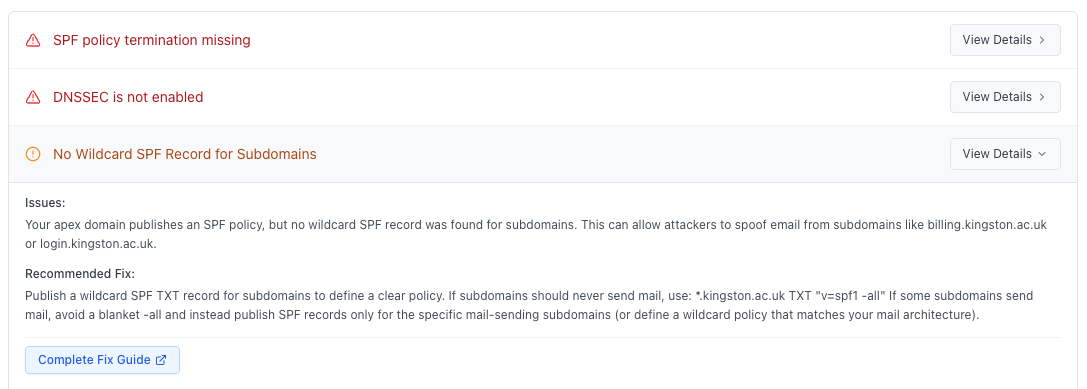
DNSAudit.io audits your DNS estate and surfaces the misconfigurations described throughout this post. You can run scans manually through the web interface and work through the results there, or use our DNS Security API to build whatever monitoring workflow fits your stack: scheduled scans, alerting pipelines, integration with your existing security tooling.
- Scans all subdomains and related domains for missing or weak SPF, DKIM, and DMARC records
- Detects SPF records exceeding the 10-lookup limit and flags PermError risks
- Identifies subdomains with
sp=noneexposure and no dedicated DMARC policy - Checks DKIM key strength and flags 1024-bit RSA and orphaned selectors
- Audits DMARC policy enforcement levels, spotting domains stuck at
p=none - Flags non-sending domains with no Null MX or null SPF configuration
- Checks for DNSSEC, CAA, MTA-STS, and BIMI configuration issues
For teams that want recurring coverage, the API makes it straightforward to schedule scans and pipe results wherever you need them. DNS records change constantly as you onboard new vendors, migrate infrastructure, or absorb acquired companies.
An SPF record that was fine six months ago may now exceed the lookup limit because SendGrid updated their IP ranges. A DKIM selector from an old ESP may still be sitting in DNS with no corresponding private key anywhere. Running regular API scans catches that kind of drift before someone else does.
The Hardened DNS Email Security Checklist
Work through this systematically. Start with your primary domain, then repeat for every subdomain and related domain in your estate.
SPF
- SPF record exists and uses
-all(hard fail), not~all(soft fail) - Total DNS lookup count is 10 or fewer (test with SPF lookup counter tools)
- No deprecated or unknown mail servers listed in SPF
- Non-sending domains and subdomains have
"v=spf1 -all" - SPF records are reviewed after any mail infrastructure change
- Wildcard SPF policy is defined or equivalent coverage ensures no subdomain is left without an explicit SPF policy
DKIM
- All outbound mail paths are DKIM-signed
- All active DKIM keys are 2048-bit RSA or Ed25519 (no 1024-bit)
- Old selectors have been revoked (
p=empty) rather than just deleted - Key rotation is scheduled (at minimum annually; quarterly is better)
- Third-party senders sign with your domain's DKIM key (not just their own)
DMARC
- DMARC policy is
p=reject(notp=noneorp=quarantine) - Subdomain policy
sp=is explicitly set toreject - Alignment is strict (
adkim=s; aspf=s) where possible pct=100: policy applies to all messages, not a percentage- Aggregate reports (
rua=) are being received and reviewed - Non-sending subdomains have their own
_dmarcrecords
Advanced
- Null MX record published for non-receiving domains
- MTA-STS policy published and set to enforce mode
- TLSRPT configured and reports reviewed
- CAA records restrict certificate issuance to known CAs
- DNSSEC is enabled at both registrar and DNS provider level
- Registrar lock is enabled on all important domains
- DNS record change alerts are configured (via DNSAudit.io API)
Closing Thoughts
SPF, DKIM, and DMARC are the right foundation. Getting to p=reject is genuinely important. Organizations that haven't done it are significantly more exposed than those that have. But stopping there is a mistake, and it's a mistake a lot of organizations make because the foundation feels like the destination.
The actual attack surface is the full DNS estate. The subdomain you forgot about. The domain from an acquisition that never got cleaned up. The SPF record that silently broke when a vendor changed their IP ranges. The DKIM key that was never rotated. The infrastructure domain with no authentication records because nobody ever emailed from it.
The fix is the same as it is in most security work: know what you have, know what state it's in, and get notified when it changes. DNSAudit.io handles that across your full DNS estate without requiring someone to manually audit zones every quarter.
The protocols are solid. The implementations are where things fall apart, and that's an operations problem as much as a technical one. It starts with knowing what you're actually working with.